


Did you know?
A visual booking calendar can reduce scheduling mistakes by up to 40% 🙌
Hydra Booking’s new Calendar View lets you:
✔ Avoid overlapping appointments
✔ Track busy days easily
✔ Manage multiple hosts at once
Simple, smart, and designed for WordPress users.
#WordPress #AppointmentTools #HydraBooking
See all your bookings visually — day, week, or month.
No more scrolling, no more confusion. Just clean scheduling.
If you run appointments in WordPress, this feature is a game-changer.
#BookingSystem #WPPlugins #HydraBooking
📅 Why a Booking Calendar View in WordPress Is Essential for Managing Appointments (A Complete Guide)
Managing appointments in WordPress has become a core need for many businesses — from online coaches and consultants to agencies, clinics, and service providers. As booking volume grows, organizing everything through a simple list becomes challenging.
This is where a Booking Calendar View becomes incredibly powerful.
Whether you're scheduling meetings, tracking appointments, or managing multiple hosts, the calendar layout gives you a clear visual picture of your entire schedule. And modern tools like Hydra Booking make this experience smooth, fast, and user-friendly.
Let’s explore why the Booking Calendar View matters and how it can transform your workflow.
🗓️ What Is a Booking Calendar View in WordPress?
A Booking Calendar View is a visual interface that displays your appointments in different layouts, such as:
- Day View → Shows all bookings for a single day
- Week View → Displays all appointments for the entire week
- Month View → Provides a complete overview of the month
- List View → A simplified list format organized by date and time
Instead of scrolling through endless data, you get an easy-to-understand visual layout that helps you manage your time quickly and effectively.
🎯 Why the Calendar View Matters (Real Benefits)
1. See All Appointments at a Glance
Whether you have 5 bookings or 50, the calendar shows everything clearly without confusion.
2. Avoid Scheduling Conflicts
You can instantly see open slots, busy periods, and overlapping appointments — making it easier to plan ahead.
3. Perfect for Teams With Multiple Hosts
If several team members or instructors handle appointments, the calendar view helps everyone stay coordinated.
4. Faster Navigation Than List View
No need to dig through pages of bookings — switch between day, week, or month in one click.
5. Great for Long-Term Planning
The monthly view helps plan promotions, events, availability windows, and seasonal booking strategy.
🚀 Hydra Booking: A Modern Calendar View for WordPress
The new Hydra Booking Frontend Dashboard offers one of the most intuitive booking calendar interfaces in the WordPress ecosystem.
Here’s what you get:
🗓️ Multiple Views for Better Control
- Calendar View for visual scheduling
- List View for quick scanning
- Day View, Week View, Month View for detailed time management
👁️ Clear Visual Indicators
Colors, labels, and status markers help instantly identify:
✔ Pending bookings
✔ Confirmed appointments
✔ Canceled or rescheduled items
🔧 One-Click Filters
- Filter by host
- Filter by meeting category
- Filter by status (coming soon)
💼 Ideal for All Business Types
Hydra Booking’s calendar view works perfectly for:
- Consultants
- Coaches
- Clinics & therapists
- Agencies
- Training providers
- Beauty or wellness services
- Home services
- Online demos & sales teams
📤 Switch Between Calendar & List View Easily
Sometimes you need a visual layout, and sometimes a simple list is enough.
Hydra Booking allows you to switch instantly:
➡ Calendar View (visual layout)
➡ List View (detailed data rows)
This flexibility makes managing bookings far more efficient.
💬 Community Question
Do you prefer Calendar View or List View when managing your bookings?
What challenges have you faced with appointment management in WordPress?
Share your experience — it may help others improve their workflow!
#WordPress #BookingCalendar #HydraBooking #WPTips #AppointmentSystem #WordPressPlugins #SmallBusinessTools #ScheduleManagement #OnlineBooking
Managing bookings is one of the most important parts of running any service-based business — whether you’re handling online meetings, coaching calls, consultations, classes, or in-person appointments.
And as your business grows, so does the amount of booking data you need to organize.
This is where the ability to export bookings as a CSV file becomes incredibly valuable.
✅ Why CSV Export Matters for Booking Management
CSV (Comma-Separated Values) files are one of the simplest and most flexible formats for working with data. Almost every tool supports them — whether you prefer Excel, Google Sheets, Numbers, or any analytics software.
Here’s why exporting bookings as CSV is so useful:
✔ 1. Easy Reporting & Analytics
You can instantly move your booking data into your favorite spreadsheet tool to analyze:
- Peak booking days
- Busy hours
- Most booked meeting types
- Host performance
- Cancellations vs. confirmations
This helps you make smarter business decisions.
✔ 2. Backup & Data Security
Having a local copy of your bookings gives you full control and peace of mind.
If anything happens — plugin migration, website issues, or switching hosting — your data stays safe.
✔ 3. Team Collaboration
Need to share booking data with your team?
CSV makes it effortless.
Send the file over email, WhatsApp, Slack, or upload it to Google Drive — everyone can open it.
✔ 4. Works With Any Tool
CSV files can be opened by:
- Excel
- Google Sheets
- Airtable
- Notion
- Power BI
- Data Studio
- CRMs
- Custom reporting tools
This flexibility makes CSV the ideal export format for businesses of all sizes.
🚀 How Hydra Booking Makes CSV Export Effortless
Many WordPress booking plugins make exporting complicated — but Hydra Booking keeps it simple.
With Hydra Booking, you get a dedicated CSV Export button right in the booking dashboard. A single click instantly downloads all visible booking data, including:
- Customer Name
- Customer Email
- Meeting Title
- Host
- Date & Time
- Duration
- Time Zone
- Status (Pending, Confirmed, Rescheduled, Canceled)
You can export the entire list view or the current calendar view, depending on how you’re organizing your schedule.
This keeps your records clean and your workflow fast.
🔧 Who Should Use CSV Export?
This feature is especially helpful if you are:
⭐ A service-based business
⭐ A consultant or coach
⭐ A support or training provider
⭐ A medical or therapy professional
⭐ A team with multiple hosts
⭐ A business needing detailed booking reports
If your business relies on appointments — CSV export is almost essential.
💬 Community Question
How do you manage your booking data?
Do you prefer working inside WordPress, or do you export and analyze your data in tools like Excel or Google Sheets?
Share your workflow — your insights can help others in the community!
#WordPress #CSVExport #BookingSystem #HydraBooking #WPTutorials #DataManagement #OnlineAppointments #WebTools #SmallBusinessSupport #WordPressCommunity
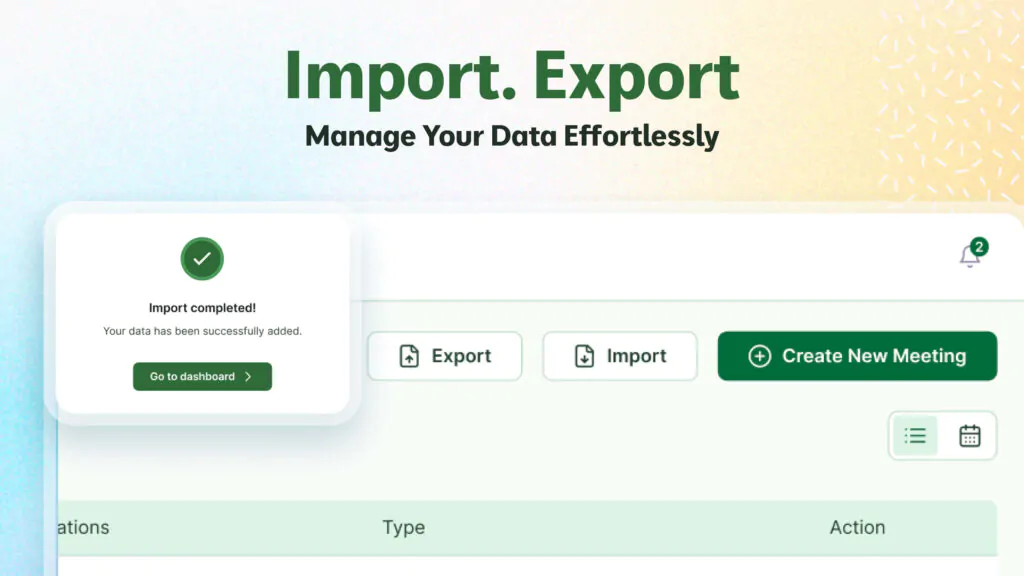
If you need an easy way to download all bookings from WordPress, using a CSV export feature is a game-changer.
You can filter → export → analyze
All in seconds!
Do you prefer Excel, Google Sheets, or another tool?
#WordPressCommunity #HydraBooking #CSV #BookingManagement
Download all your bookings instantly — perfect for:
✔ Reports
✔ Client tracking
✔ Team sharing
✔ Backup & analysis
This feature saves time and keeps your booking data organized. 🔥
Try it on your WordPress site today!
#WPlugins #HydraBooking #CSVExport #Appointments #WPFeatures
Export them as a CSV directly from your WordPress dashboard!
It’s fast, clean, and works with Excel, Google Sheets, and any reporting tool.
Hydra Booking makes it effortless. 👌
#WordPress #BookingCSV #HydraBooking #Productivity
📤 Need to export your WordPress bookings as a CSV file?
Good news! Modern booking plugins like Hydra Booking make it super easy.
With just one click, you can export:
✔ Booking details
✔ Customer information
✔ Meeting time & date
✔ Host information
✔ Status (Pending, Confirmed, etc.)
Perfect for reporting, backups, or sharing with your team.
You don't need any technical skills. 🙌
👉 Do you use CSV exports in your workflow?
#WordPress #BookingSystem #CSVExport #HydraBooking #WPTips #SmallBusinessTools
Looking for the easiest way to create booking forms in WordPress?
Whether you’re managing appointments, meetings, consultations, or events—having a smooth booking form can completely transform your workflow.
👉 With modern booking plugins like Hydra Booking, you can:
✔ Create fully customizable booking forms
✔ Add meeting titles, descriptions, host selection
✔ Support Zoom, Google Meet, in-person sessions, and phone calls
✔ Manage bookings in calendar or list view
✔ Export bookings as CSV
✔ Handle customer name, email, timezone & meeting types
✔ Set booking status (Pending / Confirmed / Rescheduled / Canceled)
No coding needed just click, configure, and publish! 🙌
💬 What features do you think a perfect WordPress booking form should have?
Share your thoughts!👇
#WordPress #BookingForms #HydraBooking #AppointmentBooking #WPPlugins #SmallBusinessTools #BookingSystem #WebDesign #WordPressExperts
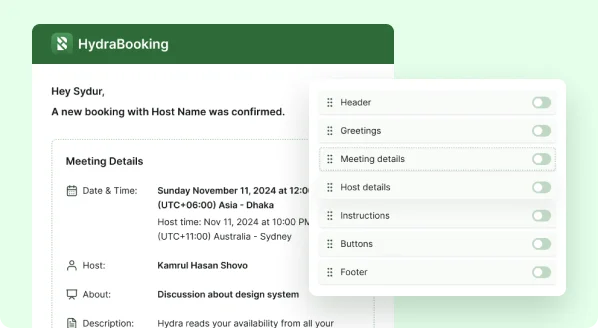
WordPress plugins play a crucial role in extending your website’s functionality without requiring complex development. Whether you want to improve SEO, enhance design, add ecommerce features, or streamline customer interactions—plugins make it possible quickly, efficiently, and affordably.
For businesses that rely on scheduling and appointments, a powerful booking plugin isn’t just helpful—it’s essential. That’s where Hydra Booking stands out.
How WordPress Plugins Help Your Business Grow
1. Easy to Use
Plugins allow you to add advanced features with just a few clicks—no coding required.
2. Cost-Effective
Forget paying for custom development. Plugins give you premium features at a fraction of the cost.
3. Time-Saving
Add appointment systems, forms, and automation instantly.
4. Customisable
Modify settings, appearance, and functionality to match your business needs.
5. Scalable
As your business expands, plugins help you add more features without rebuilding your site.
Why Hydra Booking Is the Ideal Appointment Management Solution
Hydra Booking is a complete, all-in-one appointment scheduling plugin designed for any business that books meetings, sessions, or consultations online. Whether you're a service provider, consultant, agency, clinic, salon, or freelancer—Hydra Booking helps you manage everything effortlessly.
With Hydra Booking, you can create your own Calendly-style booking system directly inside WordPress.
Key Features of Hydra Booking
✓ Seamless Integration With Popular Form Plugins
Hydra Booking works perfectly with the tools you already use:
- Contact Form 7
- Forminator Forms
- Fluent Forms
No need to build new forms—just connect Hydra Booking to your existing ones.
✓ Automated Appointment Scheduling
Let customers pick a date and time while Hydra Booking handles availability, confirmations, and notifications.
✓ Flexible & Easy to Customise
Adjust booking rules, time slots, availability, and form details to match your business workflow.
✓ Perfect for Any Service-Based Business
Hydra Booking works great for:
✔ Consultants
✔ Lawyers
✔ Clinics & medical professionals
✔ Beauty salons & spas
✔ Agencies & freelancers
✔ Fitness trainers
✔ Coaches
And any business that needs a smooth appointment system.
Hydra Booking Helps You Work Smarter
Instead of spending time manually managing your schedule, Hydra Booking automates the entire process—saving time, reducing errors, and improving customer experience.
If you're looking for a professional, reliable, and easy-to-use appointment booking system, Hydra Booking is the perfect solution for your WordPress website.
Download Now: https://wordpress.org/plugins/hydra-booking/